
Wrist-first practice
Manifestation on Apple Watch
Put the practice where the decisions happen, not where the app is.
See pricing and trial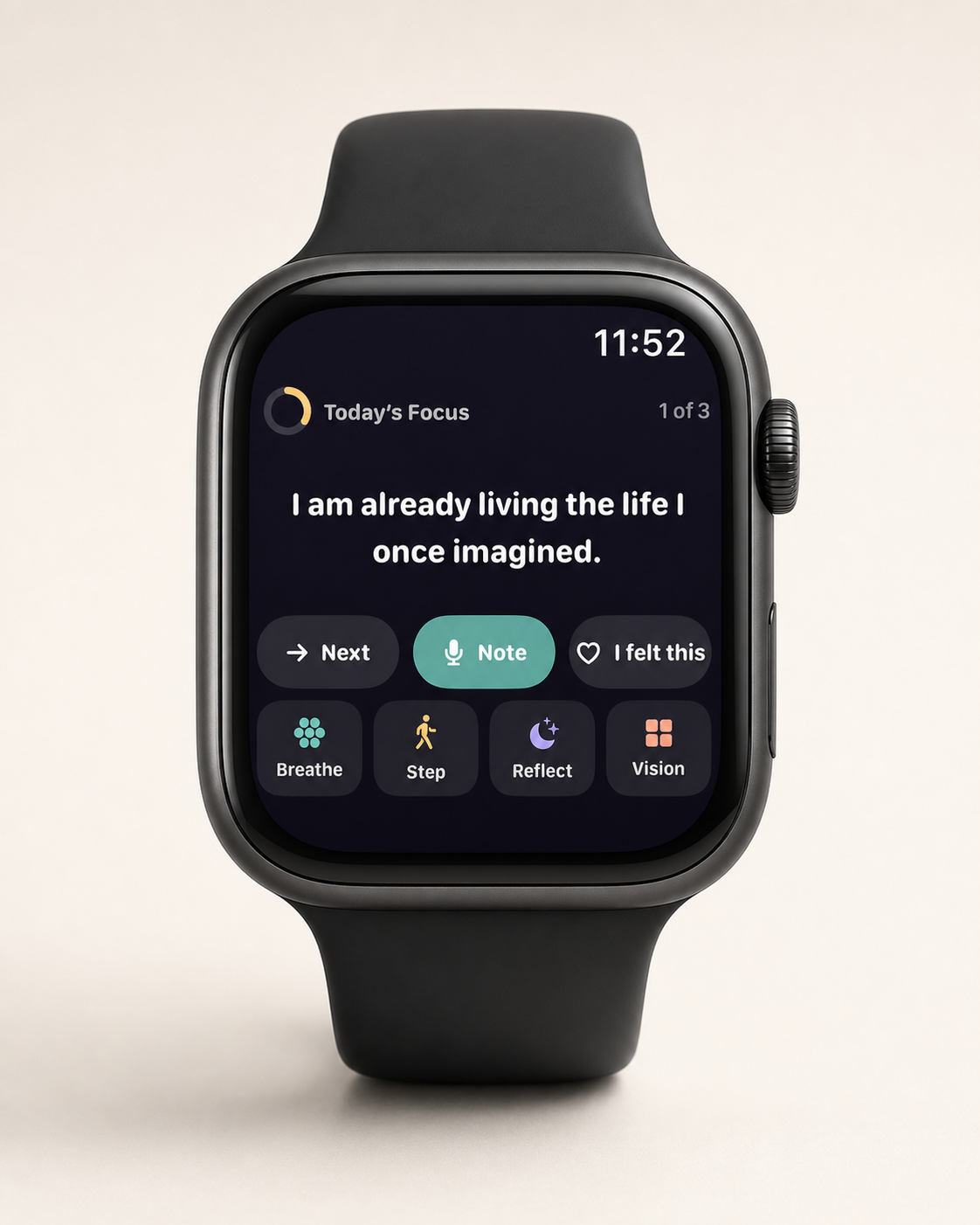
The short answer
Apple Watch suits a manifestation practice because it delivers your intention in the seconds before a decision, without opening anything. Use a complication for your focus line, a widget for today's step, and one-tap logging for reflection, with the phone kept for the longer entry.
Why the wrist beats the phone for this
A daily practice has a delivery problem. The insight arrives at 7am; the decision it should influence arrives at 2:40pm, in a corridor, thirty seconds before a conversation. Anything requiring you to unlock a phone, find an app and read a screen will not be present at 2:40.
A wrist glance takes about two seconds and costs almost nothing socially, since you can do it mid-conversation without appearing to check out. That is a genuinely different distribution channel, and it is the strongest argument for the Watch in this category.
There is a second effect worth naming. Reminders positioned close to the moment of choice change behaviour more reliably than reminders positioned close to the moment of planning. A morning intention is a plan. The same sentence at 2:40 is a prompt attached to a decision, which is where implementation intentions actually do their work.
Setting up a wrist-first practice
This works with a dedicated app and it works without one. The structure matters more than the software.
- Choose one line. A single sentence connected to your direction, short enough to read in two seconds. Not a paragraph, not an affirmation you argue with.
- Put it on the watch face. A complication, so it is present without opening anything. If your app does not offer one, a Reminders or Shortcuts complication will carry a static line.
- Put today's step somewhere glanceable. The Smart Stack, a second complication, or a Lock Screen widget on the phone as backup.
- Pick two moments. Rather than hourly buzzing, choose two natural checkpoints, mid-morning and mid-afternoon, and glance deliberately.
- Set up one-tap logging. A single tap to record that something landed. The bar has to be this low or it will not happen.
- Keep the long reflection on the phone. Typing on a watch is not a reflection practice, it is a test of patience.
The whole setup is fifteen minutes and most of it is choosing the line.
What works on a watch, and what does not
| Element | Wrist? | Why |
|---|---|---|
| A single focus line | Yes | Readable in two seconds; the ideal wrist payload |
| Today's one step | Yes | You need it at the moment you could act, not at 7am |
| One-tap signal logging | Yes | Low enough friction to actually happen in the moment |
| A haptic nudge at a chosen time | Yes | Private, and it lands even when the phone is away |
| The full vision board | No | A wall of thumbnails at 45mm is decorative, not useful |
| Long-form reflection | No | Typing or dictating a paragraph on a watch is a chore |
| Reading generated guidance | Partly | One sentence works; three paragraphs do not |
| Browsing your history | No | Navigation-heavy tasks belong on the phone |
The principle is that the watch is for the smallest useful unit of the practice, delivered at the right moment. Everything requiring thought, typing or scrolling belongs on the phone.
Getting notifications right
This is where wrist-first practices fail. A notification on your wrist is more intrusive than one on your phone, because it is physical, it happens mid-sentence, and it cannot be ignored the way a screen can. Get the frequency wrong and you will disable it within a week, taking the practice with it.
- Two a day maximum. One to set the intention, one at a checkpoint. Every additional one reduces the weight of all of them.
- Choose times you are actually free. A nudge during a standing meeting is a nudge you learn to dismiss without reading.
- Prefer haptic-only for the checkpoint. The buzz is the reminder; you look if you want the content.
- No streak alerts, no guilt notifications. "You have not opened the app" is an engagement tactic, not a practice.
- Turn them off during a hard week. The complication is still there. Silence is not abandonment.
If an app's notifications feel like they are optimising for your return rather than your practice, that is worth reading as information about the business model. An app funded by subscription has no reason to maximise your session count.
The privacy question nobody mentions
Whatever is on your watch face is visible to whoever is next to you. A complication reading "leave the job by March" is legible to a colleague standing at the same counter, and watch faces are glanced at by other people far more than phone screens are.
Three practical responses. Write the line so it is meaningful to you and opaque to others, using a keyword rather than a sentence. Use a complication that shows only an icon and a count, keeping the content one tap away. Or keep the direction off the face entirely and use the Watch app for logging only.
The separate question is what the app does with your content, which the wrist does not change. A Watch app that reads from a shared on-device store is not sending anything anywhere; one that fetches your board from a server is. See the private app checklist.
How to write a line that works on a wrist
The constraint is brutal and clarifying, about two seconds of reading, at arm's length, often in motion. Most intentions people write are three times too long for it.
- Under eight words. If it wraps to three lines on a watch, it will not be read.
- Start with a verb where you can. "Ask for the number" is processed faster than "Today I intend to ask…".
- Concrete over abstract. "Send it unfinished" beats "embrace imperfection" by a distance.
- Present tense, no hedging. Qualifiers add words and remove force.
- Written for 2:40pm, not 7am. The line is being read before a decision, not during a reflection.
- Opaque to strangers if it needs to be. A keyword you understand and a colleague does not.
A useful exercise is to write your intention normally, then cut it to eight words, then cut it to four. The four-word version is usually the one that actually changes something, because it is the one you can absorb without stopping.
Doing this without a dedicated app
You do not need to buy anything to test whether a wrist-first practice suits you. Two builds.
The Reminders build. Create a recurring daily reminder containing your focus line, set for your morning time, and a second for your afternoon checkpoint. Add the Reminders complication to your face. Completion taps give you a rough behaviour log. Total setup is five minutes. Its limitations are that the line is static until you change it, and there is no reflection capture.
The Shortcuts build. A shortcut that appends a timestamped line to a note, on the face as a complication. One tap logs "landed"; a second shortcut logs "friction." That gives you a genuine signal log with no subscription. Its limitations are no adaptation, and reviewing the note is manual.
Run either for two weeks. If you find yourself glancing and it changes something, a dedicated app will add adaptation and easier reflection. If you never glance, an app will not fix that, and you have saved yourself a subscription.
MyDirection on Apple Watch is our version of this, with complications, one-tap signal logging and a Watch app reading from the same on-device store as the phone.
Common questions
Can you use Apple Watch for a manifestation practice?
Yes, and it suits it well. The watch delivers a short intention in the seconds before a decision, which is when a reminder actually changes behaviour.
What should go on the watch, and what should not?
On the watch, one focus line, today's step and one-tap logging. On the phone, the board itself, long reflections and reviewing history.
Do I need my iPhone with me?
For most apps, the Watch reads content synced from the phone. Whether it works with the phone elsewhere depends on the app; content is generally stored on the phone.
How many notifications should I set?
Two a day at most. Wrist notifications are physical and intrusive; too many and you disable them, losing the practice along with them.
Can people see my vision board on my watch?
They can see whatever is on your face. Use a keyword rather than a full sentence, or keep the content one tap in.
Is a Watch app worth paying for?
Test the free version first with Reminders or Shortcuts for two weeks. If you glance and it changes something, an app adds adaptation and easier logging. If you never glance, it will not help.
For iPhone and Apple Watch
Keep your vision close.
Become it daily.
MyDirection is a paid subscription with a 3-day free trial. Cancel any time before the trial ends and you are not charged.
See pricing and trial