
Privacy checklist
How to tell whether an app is actually private
Nine questions, the answers that should reassure you, and the ones that should not.
See pricing and trial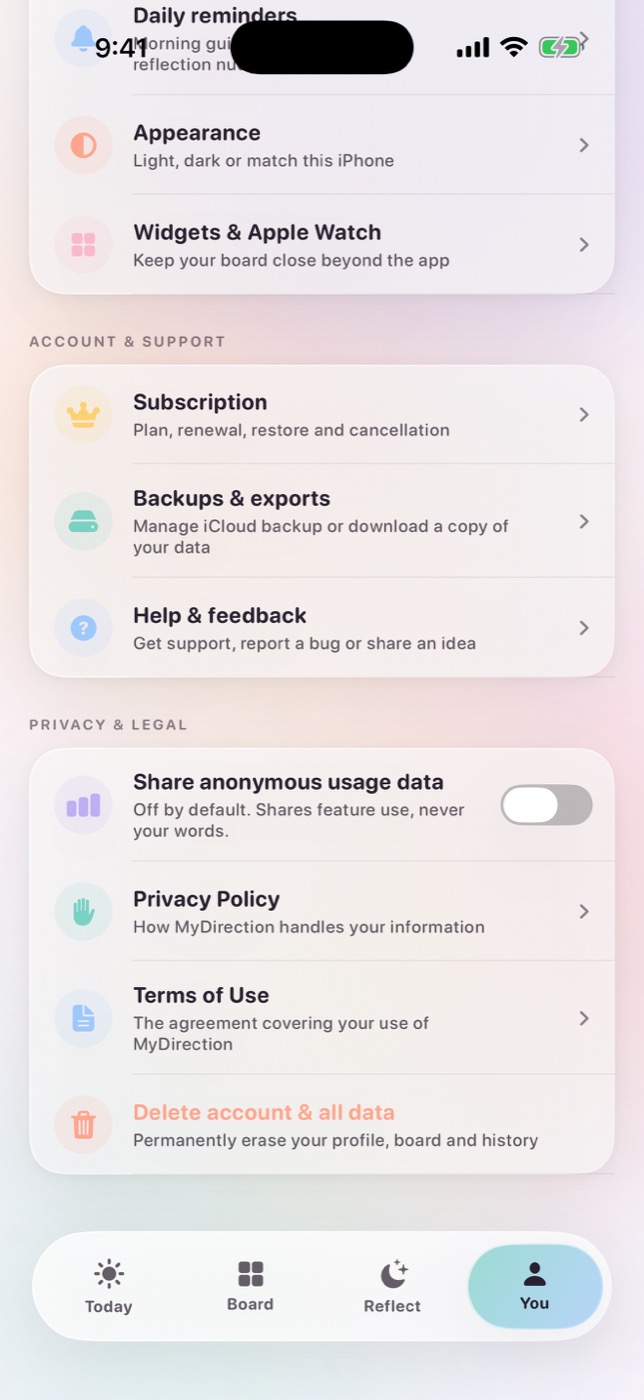
The short answer
Judge a manifestation app's privacy on nine things, namely account requirement, storage location, photo handling, what AI features send, offline capability, analytics defaults, advertising and training use, deletion, and what happens when you change modes. Vague answers to any of these are answers.
Why this category deserves more scrutiny than most
A manifestation or vision-board app holds an unusual combination of material, including photographs from your library, a written statement of what you want, and an ongoing record of how your life is actually going. Taken together that is more revealing than a social media account, and considerably more revealing than the shopping app you would never dream of trusting this much.
It is also material you produce at your least guarded. Reflective writing is only useful when it is unfiltered, and that depends on feeling unobserved. If you are not sure what happens to what you write, you will write a slightly more presentable version of your life, and a presentable reflection is worth very little.
So the privacy question here is not only about data protection. It is about whether the tool can do its job at all.
The nine questions
1. Does it require an account?
An account means your content has somewhere to live other than your device, and it usually means it does. This is not automatically bad, since sync across devices requires it, but it changes the answer to every question below. A good answer is that the app works without one, or the account holds only your subscription and settings.
2. Where is your content stored?
There are three real options, on the device, in the vendor's cloud, or in your own iCloud or equivalent. All three are defensible and they have very different implications for who can read your writing under what circumstances. A bad answer is "securely." That is a description of encryption, not of location.
3. Are photos uploaded?
Ask about the image and the caption separately, because vendors routinely conflate them. "Your photos stay on your device" can be entirely true of the pixels while the text you wrote about a photo travels with every AI request. A good answer gives a clear statement about images, and a separate clear statement about any text attached to them.
4. What exactly is sent when AI features are on?
You want the categories of content, meaning the goal description, preferences, reflections, action history and evidence. A bad answer is "your information to personalize your experience." If a policy cannot enumerate it, either nobody has audited it or the answer is uncomfortable.
5. Is there a genuine local-only mode?
Many apps describe offline support that turns out to be an error state where you can read old content and do nothing else. A good answer is a mode where the core practice completes with no network, ideally using on-device generation with a template fallback. This one is testable, so turn on Airplane Mode and try to use it.
6. Is analytics opt-in, and does off mean off?
Two separate questions. Opt-out analytics is standard and worth knowing about. More important is whether disabling it stops collection on the device or merely stops the vendor from looking at what continues to be collected. A good answer is off by default, with a switch that stops collection.
7. Is content used for advertising or model training?
Also two questions. An app can truthfully say it does not sell your data while sending your reflections to a model provider under default terms that permit training. A good answer gives an explicit statement on both, and for AI features, a statement about retention and training at the provider level.
8. Can you export and permanently delete everything, from inside the app?
Not by emailing support, not by deleting the app and hoping. A good answer is an in-app delete-everything control, plus a clear statement of what remains, for example, that no prompt history exists to delete because none is retained.
9. What happens when you change privacy modes?
This is the question almost nobody asks and it reveals the most. If switching from local to cloud silently uploads your back catalogue, the local mode was a staging area. A good answer is that changing the mode changes how future requests are handled and does not migrate existing content.
Four phrases that should slow you down
- "Your data is encrypted"
- Encryption in transit is table stakes and universal. Encryption at rest still means the vendor holds the key in most architectures. Neither tells you who can read your reflections or under what circumstances.
- "We take your privacy seriously"
- This appears in the policies of companies that have sold data. It is a sentiment, not a commitment, and it is usually where the specifics stop.
- "We do not sell your data"
- Frequently true and frequently narrow. Sharing with processors, using content to improve models, and disclosing to advertising partners can all be technically distinct from selling.
- "On-device AI"
- Ask which parts. Some apps run a small classifier locally and send everything else to a server, then market the whole product as on-device.
How to test an app in twenty minutes
Policies describe intentions. Behaviour is checkable. Before committing a year of writing, run this.
- Install and get to the first screen. Note whether an account is demanded before you can write anything.
- Read the App Store privacy label, specifically whether data is marked as linked to you and whether it includes user content.
- Turn on Airplane Mode and try to complete the core loop. Note what breaks and how clearly the app tells you.
- Turn networking back on and find the analytics setting. Note whether it was already on.
- Find the deletion control. If it takes more than a minute, that is the answer.
- Search the policy for the words photo, train, advertis, retain and delete. Read those five paragraphs and nothing else.
- Change the AI or privacy mode and look for any statement about what happens to existing content.
Twenty minutes of this tells you more than an hour of reading marketing pages. It is also the method we apply when we write about other apps. See how we review.
Two good options rather than one safe one
A useful checklist should say what each route actually gives you, because the popular framing of local as safe and cloud as risky is too crude to be useful. Local generation is excellent for a short daily practice and it works with no connection at all, though the language narrows over months and it needs hardware and a language the local model supports, which not everyone has. Cloud generation runs on any device and writes with more range, and where a vendor has disabled training and set retention to zero, your request is answered and then discarded rather than kept or learned from.
So the goal is not to maximise privacy in the abstract, and it is certainly not to steer difficult subjects toward one mode. It is to know which route you are on and what that route does. The failure is not choosing cloud generation. The failure is choosing it without knowing, or being told a local mode exists when it is really just an error state.
Both routes are covered in detail in on-device AI vs cloud AI.
Our answers, for the record
We publish this checklist and we make an app in the category, so here are MyDirection's answers in the same order. You should check them rather than take them.
- Account. Not required. Your content lives on the device; the subscription is handled by Apple.
- Storage. On-device, in an app group shared with the widgets and Watch app. iCloud backup is opt-in and off by default.
- Photos. Images are never uploaded for generation. Text you write about a photo can be included in a personalized request.
- AI requests. Goal description, journey preferences, selected reflections, check-ins, recent step choices and outcomes, evidence, and photo labels or notes.
- Local mode. Yes, on-device generation where supported, with built-in templates as fallback. Testable in Airplane Mode.
- Analytics. Off by default, and turning it off stops collection on the device. Events never contain what you write.
- Advertising and training. Neither. Requests are sent with training disabled and zero data retention.
- Deletion. Settings, then Privacy, then Delete all my data. No prompt history is retained on our side to delete.
- Mode changes. Changing modes affects future requests only, and nothing existing is migrated or uploaded.
The longer version, with the reasoning, is in what actually leaves your phone. The binding version is the privacy policy.
Common questions
What is the most private manifestation app?
Any app that works fully offline with no account, including a paper notebook. Among apps with AI features, look for a genuine on-device mode you can verify in Airplane Mode, and for a cloud mode that states plainly that requests are not retained or used for training. Either is a reasonable place to keep a practice.
Are free manifestation apps less private?
Not automatically, but a free app has to be funded somehow. Ask what the revenue is. Advertising and data monetization both create incentives that shape how your content is handled.
Should I worry about my vision board photos?
Ask whether images are uploaded for AI features. Many apps that generate imagery or captions do send them. Text you write about a photo is a separate question and often has a different answer.
What does 'zero data retention' mean?
That the model provider does not store the request after returning a response. It is a contractual setting that has to be requested and accepted; it is worth asking whether an app uses it.
Is iCloud backup safe for this kind of content?
It puts your content in your own Apple account under Apple's terms rather than a vendor's. That is usually a better position than a vendor cloud, and it is still a copy off your device.
Sources and further reading
For iPhone and Apple Watch
Keep your vision close.
Become it daily.
MyDirection is a paid subscription with a 3-day free trial. Cancel any time before the trial ends and you are not charged.
See pricing and trial