
Privacy by design
What actually leaves your phone
Your practice. Your data. Your choice, made before you write the first word.
See pricing and trial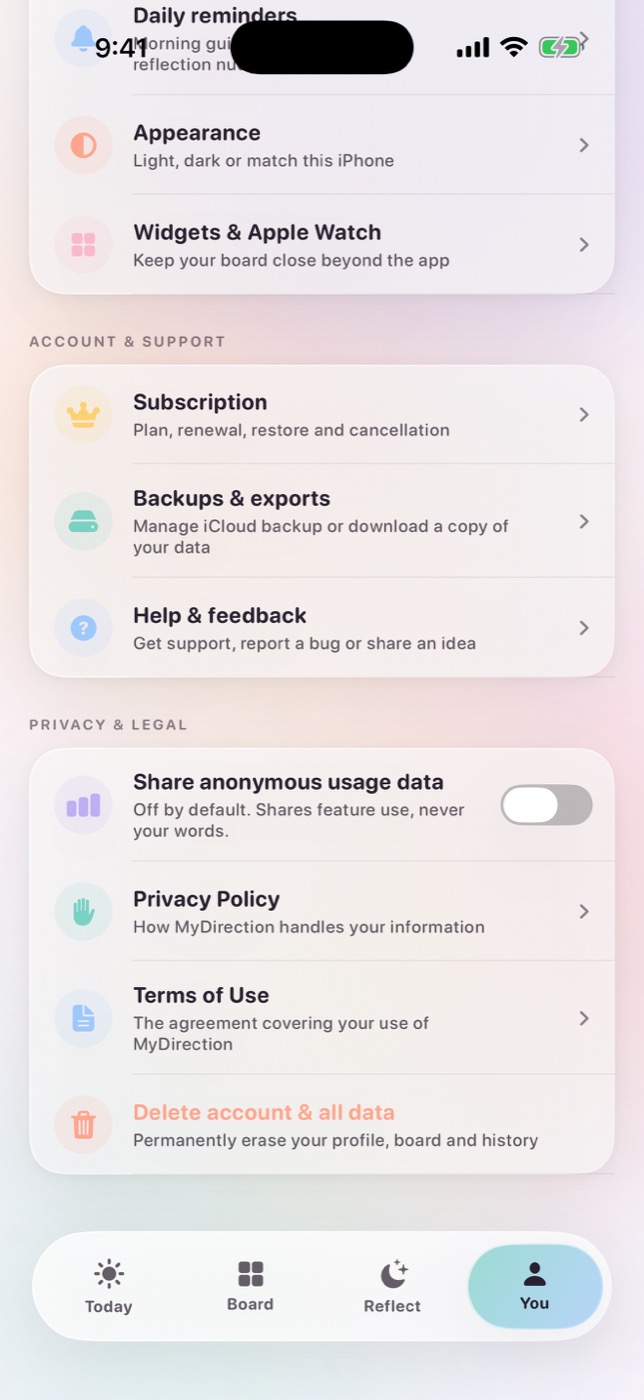
The short answer
MyDirection offers two modes. Private writing keeps supported generation on your iPhone, so your personal text is not sent to our generation service. Secure AI personalization sends the text needed to write your guidance, with training disabled and zero data retention. Photo images are never uploaded for generation in either mode.
The choice you make before you write anything
Most apps in this category ask you to hand over your goals, your fears and your reflections, then explain what happens to them somewhere in a policy you were never going to read. MyDirection inverts that. During onboarding, before you have written a single sentence, you choose how your content is generated. The choice is presented as a real fork with real trade-offs, not as a consent banner designed to be dismissed.
There are two modes, and neither is hidden behind a paywall tier or a settings screen you have to hunt for. You can change your mind later, in either direction, without losing your history.
- Private writing
- Generation happens on your iPhone using Apple's on-device model where your device supports it. Built-in templates cover the daily practice when generation is unavailable or offline. In this mode your personal generation text is not sent to our generation service at all.
- Secure AI personalization
- The text needed to write your guidance is sent to our generation service and on to a model provider, which returns your daily lines and reflections prompts. This produces more varied and more specific writing because the model can see more of your own language.
Both are good and we would happily recommend either. Private writing keeps everything on the phone and works with no connection, which suits a one-minute practice very well, though it does need recent hardware and a supported language. Secure personalization runs on any device, writes with more range, and sends the request with training disabled and zero data retention, so what you write answers you and is then discarded rather than stored or used to train anything. Neither mode is the one for difficult subjects and neither is the one for easy ones. Write what you want in either, and change your mind whenever it suits you.
What private writing actually does
In private writing mode, MyDirection uses Apple's on-device language model where the device supports it. The request never leaves the phone, which means it also works on a plane, in a tunnel, or with the network switched off entirely. When the on-device model is unavailable (an older device, a language that is not supported, or a moment when the system declines the request) MyDirection falls back to a library of built-in templates written by us and shipped inside the app.
The fallback matters more than it sounds. A practice that silently breaks when generation is unavailable is a practice you stop trusting. In MyDirection the daily loop always completes, so you always get a line to focus on, you can always record a step, and the evening reflection always saves. The quality of the writing varies; the availability of the practice does not.
What private writing does not do is make your device a black box. Your board, your reflections, your evidence and your history are stored in an on-device database and a shared app group, so the widgets and the Apple Watch app can read the same content. That is a local architecture decision, not a network one. Nothing about it involves a server.
What secure AI personalization sends
If you turn on secure AI personalization, you should know what is in the request. We are not going to summarize it as "some data" and leave you to guess. The request can include the categories of text you have given the app to work with.
- your goal or direction description, in your own words;
- your journey preferences, such as the tone you asked for;
- reflections you have written, where they are relevant to the request;
- weekly check-in responses;
- recent daily-step choices and their outcomes;
- evidence entries you have logged;
- any labels or notes you have written about the photos on your board.
That last one is the part people usually miss, so it is worth stating plainly that the photo image itself is never uploaded, but if you have typed a caption or a note describing a photo, that text is text, and it can be part of the request. If you would not want a sentence leaving your device, do not write it as a photo note while personalization is on.
Requests are sent to our generation service, which verifies your access, enforces usage limits and routes the request onward to a model provider. Those requests are sent with training disabled and zero data retention, and are only routed to providers that accept those settings. We do not store your generation prompts or the generated text on our server, which also means there is no prompt history for us to retrieve, mine, or hand to anyone.
Your photos stay on your device
The images on your board are the most personal thing in the app and the least useful thing to send anywhere. They are pictures of your family, your home, places you want to go, and sometimes a body you are hoping to feel better in. None of that improves a generated sentence enough to justify uploading it.
So MyDirection does not send photo pixels for generation, in either mode. The board is a visual anchor rendered on your device, from images stored on your device. When you see your board on a widget or on Apple Watch, it is being read from the shared app group on the same hardware, not fetched from a server.
This is also why MyDirection does not generate images of your future for you. Several apps in this category will happily produce an AI rendering of your imagined life. It is a compelling demo. It also requires shipping a description of your private hopes to an image model, and it replaces the one part of a vision board that genuinely benefits from being yours, the specific and slightly imperfect photograph that means something because you chose it.
Analytics is off until you turn it on
MyDirection includes product analytics so we can tell whether features are used and whether purchases succeed or fail. It is off by default. If you never touch the setting, nothing is collected.
If you do turn it on, the events are structural rather than personal. They contain enum values, counts and flags (the fact that a reflection was submitted, the fact that a paywall was viewed) along with standard technical details such as app and OS version, device model, screen size and an anonymous device identifier. The events never include the words you write or the content MyDirection generates. You can withdraw consent at any time, and turning analytics off stops collection on your device rather than merely stopping us from looking at it.
There is no advertising SDK, no attribution network beyond what Apple provides through the App Store, and no third-party tracker embedded in the app to sell audience segments. This is not a moral position so much as a structural one, since the subscription is how the app is funded, which removes the incentive that produces those integrations in the first place.
What MyDirection never does
- We do not sell your personal data. Not to advertisers, data brokers, or partners.
- We do not use your writing for advertising. There is no profile being assembled from your goals.
- We do not send requests for model training. Generation requests are sent with training disabled and zero retention.
- We do not upload your photos for generation. Photo pixels never leave the device for that purpose.
- We do not require an account to think. Your content lives on your device, not in an account we hold.
- We do not back anything up without asking. iCloud backup is a setting you switch on, and it is off by default.
If you do enable iCloud backup, the same content is stored in your own private iCloud account under Apple's terms, and we still have no access to it. Turning the setting off stops further syncing; to remove what is already there, delete the app's data from within MyDirection or manage iCloud storage in iOS Settings under your Apple ID.
Delete means delete
You can export or delete your locally stored content at any time, and you can withdraw cloud AI permission in Settings without losing what you have already written. Settings → Privacy → Delete all my data erases everything the app holds on the device. Deleting the app removes local content too.
Because we do not retain prompt history, there is no separate server-side archive of your reflections to request the deletion of. If you have questions about request metadata or analytics data, or want its deletion where applicable, the contact address is in the policy and a human answers it.
One deliberate design decision is that changing your privacy mode does not quietly migrate your old content into the new mode. Switching from private writing to secure personalization does not upload your back catalogue of reflections; it changes how future requests are handled. That is the behaviour most people assume and few apps actually implement.
What each mode is actually like to use
A privacy page that only lists reassurances is marketing, so here is what each mode is genuinely like after a few months of use.
On-device models are small, because they run inside a phone's memory budget, and they are very well suited to the shape of this practice. A focus line, a reflection question and a step suggestion are short pieces of writing, they generate instantly, and they work on a plane. Over months you will notice the language narrowing a little, and it draws connections across a long run of reflections less often than a larger model would. The bigger practical limit is simply that on-device generation needs recent hardware and a supported language, which is why the second mode exists at all.
Secure personalization goes the other way. It runs on any device, keeps its range over a long practice, and holds more of your history in view when it writes. The request is answered and then discarded, and no model is trained on it. What it needs is a connection. Everything else is identical in both modes, including the prompts, the step sizing, the ratings, the evidence log and the whole daily loop. Both are covered in depth in on-device AI vs cloud AI.
How to check any app that asks for this much of you
You should not take our word for any of this, and the same scepticism applies to every app in the category. These are the questions worth asking before you commit a year of private writing to a product, in roughly the order that reveals the most.
- Does it work without an account? An app that requires a login before you can write has made a choice about where your content lives.
- Where is content stored, on the device, in the vendor's cloud, or in your own iCloud? All three are defensible; the vagueness is not.
- Are photos uploaded? Ask specifically about pixels versus captions, because they are different answers.
- What exactly is sent when AI features are on? A policy that says "your information" is not an answer.
- Is there a genuinely usable mode with no cloud calls, or is offline just a degraded error state?
- Is analytics opt-in or opt-out, and does the off switch stop collection or only stop reporting?
- Is content used for advertising or model training? These are separate questions and need separate answers.
- Can you export and permanently delete everything from inside the product, without emailing support?
- What happens to existing content when you change privacy modes?
We wrote that list as a standalone tool, because it is more useful applied to five apps than to one. See the private manifestation app checklist, and on-device AI versus cloud AI for what the underlying trade-off actually costs in output quality.
Common questions
Does MyDirection require an account?
No. Your board, reflections and history live on your device. Subscriptions are handled through your Apple ID, which means we never see your payment details either.
Is private writing worse than secure personalization?
No. It is very good at the short, frequent writing this practice needs, and it runs instantly with no connection. Over months the language narrows a little and it connects fewer patterns across a long run of reflections. The daily loop is identical, and most people find the difference smaller than they expected.
Can I switch modes later?
Yes, in Settings, in either direction. Switching does not upload your existing content. It changes how future requests are handled.
Do you use my reflections to train AI models?
No. Generation requests are sent with training disabled and zero data retention, and are only routed to providers that accept those settings.
What happens to my data if I stop subscribing?
Your content stays on your device. Cancelling a subscription does not delete anything, and you can export or erase your content yourself at any time.
Where can I read the actual legal policy?
The full privacy policy is the binding document, and it is the source this page summarizes. If the two ever disagree, the policy is correct and this page is a bug we want reported.
Sources and further reading
For iPhone and Apple Watch
Keep your vision close.
Become it daily.
MyDirection is a paid subscription with a 3-day free trial. Cancel any time before the trial ends and you are not charged.
See pricing and trial